> For the complete documentation index, see [llms.txt](https://multiplesx.gitbook.io/help/llms.txt). Markdown versions of documentation pages are available by appending `.md` to page URLs; this page is available as [Markdown](https://multiplesx.gitbook.io/help/how-to-create-a-funding-rate-arbitrage-bot.md).
# How to Create a Funding Rate Arbitrage Bot?
1. **Go to** [**this page**](https://multiplesx.com/arbitragebot/fundingrate) **and click on "Create".**
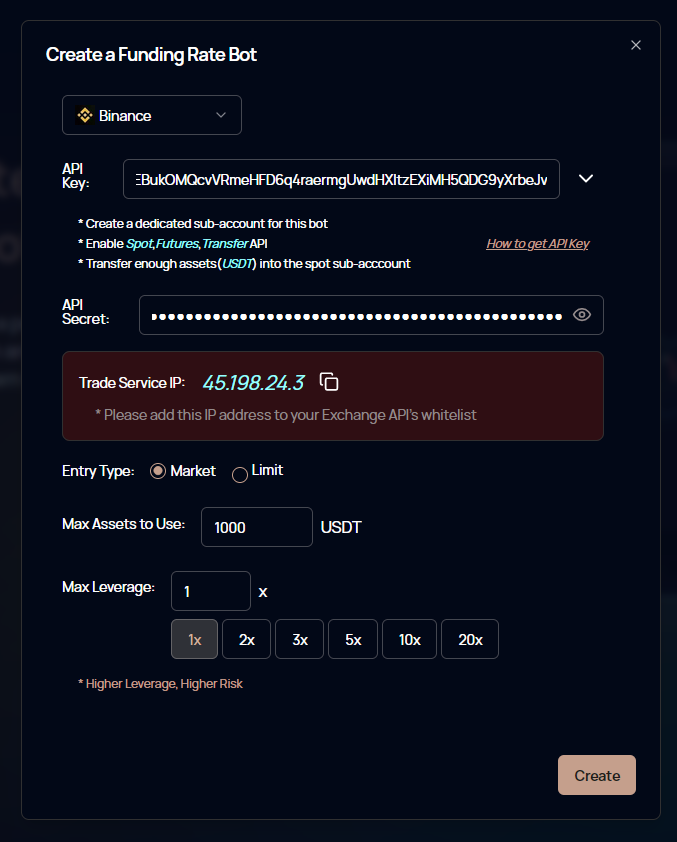
2. **Select exchange, Input API Key and Configure Settings**:
* Enter your API Key and Secret.
* Configure the following settings:
* **Entry Type: Market or Limit**
Market orders ensure that both hedging positions are filled, minimizing risk but incurring higher fees. Limit orders have lower fees but may fail to establish hedging positions during volatile market conditions, potentially leading to losses.
* **Max Assets to Use**
Set the maximum amount you are willing to invest. The bot will automatically adjust positions but will not exceed the set limit.
* **Max Leverage**
Set the maximum leverage you are comfortable with. The arbitrage bot will automatically adjust the leverage but will not exceed your set limit.
**Note**: Learn how to set up your API Key and Secret [here](/help/how-to-start-live-trading/how-to-start-live-trading-on-binance.md). Ensure you enable *Spot*, *Futures*, Universal *Transfer* API, and transfer enough assets (*USDT*) into the spot sub-account.
3. **Create the Bot**:
Click "Create" and then "Confirm".
Congratulations! You have successfully created the arbitrage bot.
4. **Manage and Monitor Performance**:
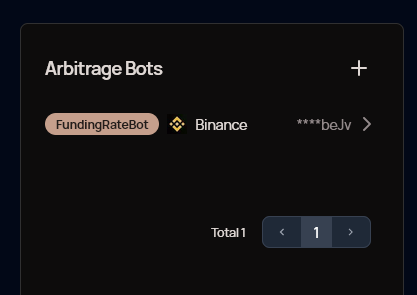
You can manage and check the performance of your bot in the User Center.
If you want to stop the bot, click "Stop" , then the assets will be automatically converted back to USDT.
## Frequently Asked Questions
#### 1. How does funding rate arbitrage work?
Funding rate arbitrage is a delta-neutral strategy that allows traders to hedge their positions in the futures market by taking an opposite position in the spot market. Any loss from a price movement in the futures market is offset by a profit in the spot market, and vice versa. This allows traders to earn funding fees without closing any positions. Learn more about how it works on this [page.](https://www.binance.com/en/support/faq/how-to-use-the-funding-rate-arbitrage-on-binance-futures-61012e690cf343e7979649282a2ccc3c)
#### 2. Which exchanges are currently supported?
Currently, Binance is supported.
#### 3. Why are initial returns negative?
Initial returns may be negative due to fees incurred during opening, adjusting, and closing positions on Binance.
#### 4. What are the risks?
While the Funding Rate Arbitrage Bot is designed to generate returns through a low-risk strategy, all investments carry some degree of risk, including the potential loss of principal. During extreme market volatility (e.g., sudden price spikes or plunges), the futures position might be forcibly liquidated while the spot position fails to execute at a favorable price, leading to significant losses. We have stop-loss mechanisms to mitigate this risk, but they cannot guarantee absolute safety during extreme market movements.
#### 5. How does it differ from Binance's funding rate arbitrage bot?
Our Funding Rate Arbitrage Bot offers a fully automated experience:
* **Automatic Asset Selection**: Automatically selects the optimal assets for funding rate arbitrage.
* **Automatic Leverage Adjustment**: Sets the appropriate leverage based on the selected assets.
* **Automatic Exit and Reinvestment**: Automatically exits and switches investment targets.
* **Stop-Loss Mechanisms**: Automatically sets stop-losses to exit early during extreme conditions.